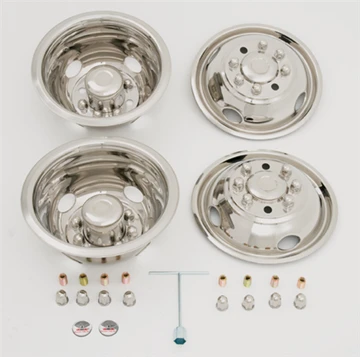

Phoenix USA DOT Sim Set (GD816)
The Phoenix USA DOT Sim Set (GD816) offers a practical and visually appealing upgrade for your dual-rear-wheel truck. This set of four wheel simulators is constructed from polished stainless steel, providing a durable and corrosion-resistant solution to enhance the overall appearance of your vehicle. Specifically designed for select Ford and Dodge models, this kit offers a straightforward bolt-on installation process, eliminating the need for complex modifications.
KEY FEATURES AND BENEFITS:
Visual Appeal: The primary benefit is the significant improvement in the truck's aesthetics, offering a cleaner, more finished look that resembles aftermarket wheels without the associated cost.
Polished Stainless Steel Construction: Ensures longevity and resistance to rust and other environmental factors, maintaining its shine over time with proper care.
Bolt-On Installation: Simplifies the installation process, allowing users to easily attach the simulators over their existing lug nuts using the included hardware.
Wheel Compatibility: Specifically designed to fit 16-inch diameter by 6-inch wide dual-rear-wheel applications with an 8-lug pattern on a 6.5-inch bolt circle and a 9/16" x 18 stud size.
Front and Rear Simulators: The front simulators feature a dished design, while the rear simulators are deep-dished to seamlessly contour with the shape of the wheel.
Pop-Out Centers: Front simulators are equipped with pop-out centers, providing convenient access to manual locking hubs on applicable models.
Convenient Handling: The inclusion of four hand holes on each simulator facilitates easier handling and maneuvering during installation and removal.
Complete Kit: Each kit includes a complete set of four wheel covers (two for the front and two for the rear), along with all the necessary mounting hardware, an installation tool, and a comprehensive instruction sheet.
Product Name: Phoenix USA Inc DOT Style Bolt On Wheel Simulator Kit
Part Number: GD816
Material: Polished Stainless Steel
Finish: Polished
Vehicle Fitment:
1985 – 1998 Ford F350 (Dual Rear Wheel)
1994 – 1998 Dodge Ram 3500 (2WD/4WD Dual Rear Wheel)
1985 – 1991 Ford E-350 Econoline (Dual Rear Wheel)
Wheel Diameter Compatibility: 16 inches
Wheel Width Compatibility: 6 inches
Lug Pattern: 8 lug holes
Bolt Circle Diameter: 6.5 inches
Stud Size Compatibility: 9/16" x 18
Mounting Style: DOT Over-Lug, Bolt-On, Stud Mount
Number of Hand Holes: 4 per simulator
Kit Contents: 2 Front Wheel Simulators, 2 Rear Wheel Simulators, Mounting Hardware, Installation Tool, Instruction Sheet
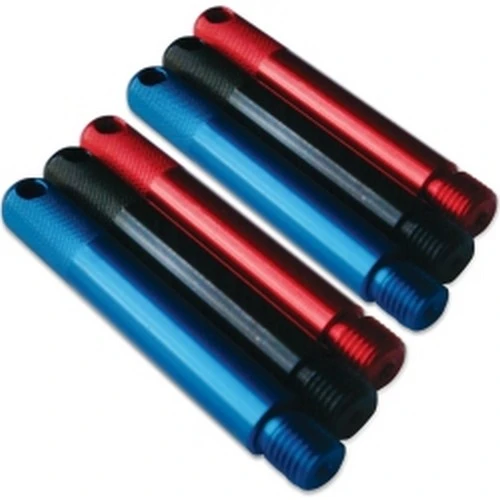
Optional Accessories (some kits): AML1 Air Max Braided Stainless Valve Extensions
Installing the Phoenix USA DOT Sim Set (GD816) is a straightforward process. Please follow these steps carefully:
Preparation: Ensure your vehicle is parked on a level surface with the parking brake engaged. Gather all the components of the kit, including the front and rear simulators, mounting hardware, and the installation tool.
Identify Front and Rear Simulators: The front simulators will typically be less deep (dished out) and may have a pop-out center cap. The rear simulators will be deeper to accommodate the dual wheel setup.
Position the Simulator: Take one of the front wheel simulators and align it with the lug nuts on your front wheel. Ensure the stud holes on the simulator correspond with the position of your wheel studs.
Secure the Simulator (Front): Using the provided mounting hardware (typically specialized nuts or brackets), attach the simulator over the existing lug nuts. Tighten the hardware evenly and securely using the installation tool. Do not overtighten. If your front wheels have manual locking hubs, ensure the pop-out center cap is accessible or removed as needed.
Position the Simulator (Rear – Outer): Take one of the outer rear wheel simulators and align it with the lug nuts on the outer rear wheel. Again, ensure the stud holes match the stud positions.
Secure the Simulator (Rear – Outer): Attach the outer rear simulator over the lug nuts using the provided mounting hardware, tightening evenly and securely with the installation tool.
Position the Simulator (Rear – Inner): Carefully position the inner rear wheel simulator, ensuring it aligns correctly with the wheel. This simulator will likely be held in place by the outer simulator. If valve stem extensions are included, install them at this stage according to their specific instructions, typically mounting using the jam nuts of the wheel cover.
Final Check: Once all four simulators are installed, double-check that all mounting hardware is securely fastened. Ensure the simulators are sitting flush against the wheels.
Refer to Instructions: Always consult the included instruction sheet for any specific details or variations in the installation process for your particular vehicle.
BENEFITS OF USING THE PHOENIX USA DOT SIM SET (GD816):
Enhanced Visual Appeal: The polished stainless steel finish provides a significant upgrade from standard steel wheels, giving the truck a more refined and custom look.
Durable Construction: Offers long-lasting performance and resistance to rust and corrosion, ensuring the simulators maintain their appearance even in harsh environments.
Easy Installation: The simple bolt-on installation saves time and effort, allowing for a quick and easy upgrade without the need for professional installation or modifications to the vehicle.
Precise Fitment: Designed for popular Ford and Dodge dually models, ensuring proper and secure attachment.
Convenient Design Features: Access features like pop-out centers for manual locking hubs on front simulators and hand holes for easier handling during installation.
Cost-Effective: Provides a cost-effective alternative to purchasing expensive aftermarket wheels while still achieving a significant visual upgrade.
Constructed from high-grade polished stainless steel for lasting shine and corrosion resistance.
Designed for direct bolt-on installation over existing lug nuts – no lug nut removal required.
Specifically engineered for 16-inch dual-rear-wheel setups on compatible Ford and Dodge trucks.
Front simulators feature a dished profile for an enhanced look.
Rear simulators have a deep-dished design to contour seamlessly with the dual wheel assembly.
Front simulators include pop-out center caps for easy access to manual locking hubs.
Equipped with four strategically placed hand holes for simplified handling and mounting.
Includes all necessary mounting hardware and a dedicated installation tool for user convenience.
Meets Department of Transportation (DOT) standards, ensuring safety and regulatory compliance.
Provides a significant visual upgrade, enhancing the overall appearance of the vehicle.
Offers a more economical alternative to purchasing complete aftermarket wheel sets.
Designed for a precise and secure fit on the specified vehicle models and wheel specifications.
Some kits may include braided stainless steel valve extensions for easier access to inner rear tire valves.
Product identification
- Brand: Phoenix USA
- Model / MPN: GD816